8. Game play#
8.1 Splash screen#
    ORG     $6008
RESET_GAME:
    SUBROUTINE

    JSR     CLEAR_HGR1

    LDA     #$FF
    STA     .rd_table+1
    LDA     #$0E
    STA     .rd_table+2     ; RD_TABLE = 0x0EFF
    LDY     #$00
    STY     GAME_ROWNUM
    STY     GAME_MODE
    STY     DISK_LEVEL_LOC  ; GAME_ROWNUM = DISK_LEVEL_LOC = GAME_MODE = 0
    LDA     #$20
    STA     HGR_PAGE
    STA     DRAW_PAGE       ; HGR_PAGE = DRAW_PAGE = 0x20

    ⟨splash screen loop⟩

    STA     TXTPAGE1
    STA     HIRES
    STA     MIXCLR
    STA     TXTCLR
    JMP     LONG_DELAY
This loop writes a screen of graphics by reading from the table starting at $0F00. The table is in pairs of bytes, where the first byte is the byte offset from the beginning of the row, and the second byte is the byte to write. However, if the first byte is 0x00 then we end that row.
As in other cases, the pointer into the table is stored in the LDA instruction that reads from
the table.
The code takes advantage of the fact that all bytes written to the page have their high bit
set, while offsets from the beginning of the row are always less than 0x80. Thus, if we
read a byte and it is 0x00, we end the loop. Otherwise, if the byte is less than 0x80 we
set that as the offset. Otherwise, the byte has its high bit set, and we write that byte to the
graphics page.
.draw_splash_screen_row:
    JSR     ROW_TO_ADDR     ; ROW_ADDR = ROW_TO_ADDR(Y)
    LDY     #$00

.loop:
    INC     .rd_table+1
    BNE     .rd_table
    INC     .rd_table+2     ; RD_TABLE++

.rd_table:
    LDA     $1A84           ; A <- *RD_TABLE ($1A84 is just a dummy value)
    BEQ     .end_of_row     ; if A == 0: break
    BPL     .is_row_offset  ; if A > 0: A -> Y, .loop
    STA     (ROW_ADDR),Y    ; *(ROW_ADDR+Y) = A

    INY                     ; Y++
    BPL     .loop           ; While Y < 0x80 (really while not 00)

.is_row_offset:
    TAY
    BPL     .loop           ; Unconditional jump

.end_of_row:
    INC     GAME_ROWNUM
    LDY     GAME_ROWNUM
    CPY     #192
    BCC     .draw_splash_screen_row
    ORG     $75F4
HANDLE_TIMERS:
    SUBROUTINE

    JSR     GUARD_RESURRECTIONS

    ; Increment GUARD_RESURRECT_COL mod 29

    INC     GUARD_RESURRECT_COL
    LDA     GUARD_RESURRECT_COL
    CMP     #MAX_GAME_COL+1
    BCC     .guard_col_incremented

    LDA     #$00
    STA     GUARD_RESURRECT_COL

.guard_col_incremented:
    LDX     #$1E        ; 30

.loop:
    LDA     BRICK_FILL_TIMERS,X
    STX     TMP_LOOP_CTR
    BNE     .table_ce0_nonzero
    JMP     .next

.table_ce0_nonzero:
    DEC     BRICK_FILL_TIMERS,X
    BEQ     .brick_fill_timer_expired

    LDA     BRICK_DIG_COLS,X
    STA     GAME_COLNUM
    LDA     BRICK_DIG_ROWS,X
    STA     GAME_ROWNUM

    LDA     BRICK_FILL_TIMERS,X
    CMP     #$14            ; 20
    BNE     .check_for_10

    LDA     #SPRITE_BRICK_FILL0

.draw_sprite:
    JSR     DRAW_SPRITE_PAGE2
    LDX     GAME_COLNUM
    LDY     GAME_ROWNUM
    JSR     GET_SCREEN_COORDS_FOR
    LDA     #SPRITE_EMPTY
    JSR     ERASE_SPRITE_AT_PIXEL_COORDS

.next_:
    JMP     .next

.check_for_10:
    CMP     #$0A            ; 10
    BNE     .next_

    LDA     #SPRITE_BRICK_FILL1
    BNE     .draw_sprite            ; Unconditional

.brick_fill_timer_expired:
    LDX     TMP_LOOP_CTR
    LDY     BRICK_DIG_ROWS,X
    STY     GAME_ROWNUM
    <<set active and background row pointers [[PTR1]] and [[PTR2]] for [[Y]]>>
    LDY     BRICK_DIG_COLS,X
    STY     GAME_COLNUM
    LDA     (PTR1),Y
    CMP     #SPRITE_EMPTY
    BNE     .check_for_brick_fill_player_kill
    JMP     .draw_brick

.check_for_brick_fill_player_kill:
    CMP     #SPRITE_PLAYER
    BNE     .check_for_brick_fill_guard_kill
    LSR     ALIVE

.check_for_brick_fill_guard_kill:
    CMP     #SPRITE_GUARD
    BEQ     .kill_guard

    CMP     #SPRITE_GOLD
    BNE     .draw_brick_
    DEC     GOLD_COUNT

.draw_brick_:
    JMP     .draw_brick

.kill_guard:
    LDA     #SPRITE_BRICK
    STA     (PTR1),Y
    STA     (PTR2),Y
    JSR     DRAW_SPRITE_PAGE1
    LDA     #SPRITE_BRICK
    JSR     DRAW_SPRITE_PAGE2
    LDX     GUARD_COUNT

.find_killed_guard:
    LDA     GUARD_LOCS_COL,X
    CMP     GAME_COLNUM
    BNE     .next_guard
    LDA     GUARD_LOCS_ROW,X
    CMP     GAME_ROWNUM
    BNE     .next_guard

    LDA     GUARD_GOLD_TIMERS,X
    BPL     .reset_guard_gold_timer
    DEC     GOLD_COUNT

.reset_guard_gold_timer:
    LDA     #$7F
    STA     GUARD_GOLD_TIMERS,X
    STX     GUARD_NUM
    JSR     LOAD_GUARD_DATA
    JSR     GET_GUARD_SPRITE_AND_COORDS
    JSR     ERASE_SPRITE_AT_PIXEL_COORDS
    LDX     GUARD_NUM
    LDY     #$01
    STY     GAME_ROWNUM

.row_loop:
    LDY     GAME_ROWNUM
    <<set background row pointer [[PTR2]] for [[Y]]>>
    LDY     GUARD_RESURRECT_COL

.col_loop:
    LDA     (PTR2),Y
    CMP     #$00
    BEQ     .found_good_resurrect_loc

    INC     GUARD_RESURRECT_COL
    LDY     GUARD_RESURRECT_COL
    CPY     #MAX_GAME_COL+1
    BCC     .col_loop

    INC     GAME_ROWNUM
    LDA     #$00
    STA     GUARD_RESURRECT_COL
    BEQ     .row_loop               ; unconditional

.found_good_resurrect_loc:
    TYA
    STA     GUARD_LOCS_COL,X
    LDA     GAME_ROWNUM
    STA     GUARD_LOCS_ROW,X
    LDA     #$14            ; 20
    STA     GUARD_RESURRECTION_TIMERS,X
    LDA     #$02
    STA     GUARD_Y_ADJS,X
    STA     GUARD_X_ADJS,X
    LDA     #$00
    STA     GUARD_ANIM_STATES,X
    LDY     #$00
    LDA     #$75
    JSR     ADD_AND_UPDATE_SCORE        ; SCORE += 75
    JMP     .next

.next_guard:
    DEX
    BNE     .find_killed_guard

    ; This should never fall through

.draw_brick:
    LDA     #SPRITE_BRICK
    STA     (PTR1),Y
    JSR     DRAW_SPRITE_PAGE1
    LDA     #SPRITE_BRICK
    JSR     DRAW_SPRITE_PAGE2

.next:
    LDX     TMP_LOOP_CTR
    DEX
    BMI     HANDLE_TIMERS_COMMON_RETURN
    JMP     .loop

HANDLE_TIMERS_COMMON_RETURN:
    RTS
HANDLE_TIMERSADD_AND_UPDATE_SCORE, ALIVE, DRAW_SPRITE_PAGE1, DRAW_SPRITE_PAGE2, ERASE_SPRITE_AT_PIXEL_COORDS, GAME_COLNUM, GAME_ROWNUM, GET_GUARD_SPRITE_AND_COORDS, GET_SCREEN_COORDS_FOR, GOLD_COUNT, GUARD_ANIM_STATES, GUARD_COUNT, GUARD_GOLD_TIMERS, GUARD_LOCS_COL, GUARD_LOCS_ROW, GUARD_NUM, GUARD_X_ADJS, GUARD_Y_ADJS, LOAD_GUARD_DATA, PTR1, PTR2, SCORE, TMP_LOOP_CTR8.2 Startup code#
The startup code is run immediately after relocating memory blocks.
The first address, ROMIN_RDROM_WRRAM2 is a bank-select switch. By reading it twice, we set
up the memory area from $D000-$DFFF to read from the ROM, but write to RAM bank 2.
The next four softswiches set up the display for full-screen hi-res graphics, page 1.
ROMIN_RDROM_WRRAM2      EQU     $C081
TXTCLR                  EQU     $C050
MIXCLR                  EQU     $C052
TXTPAGE1                EQU     $C054
HIRES                   EQU     $C057
    ORG     $5F7D
MAIN:
    LDA     ROMIN_RDROM_WRRAM2
    LDA     ROMIN_RDROM_WRRAM2
    LDA     TXTCLR
    LDA     MIXCLR
    LDA     TXTPAGE1
    LDA     HIRES
The 6502 stack, at maximum, runs from $0100-$01FF. The stack starts at $0100 plus the stack index (the S register), and grows towards $0100. Here we are setting the S register to 0x07
which makes for a very small stack – 8 bytes.
    LDX     #$07
    TXS
This next part seems to set the carry only if certain bits in location $5F94 are set. I can find no writes to this location, so the effect is that the carry is cleared. It's entirely possible that this was altered by the cracker.
    CLC
    LDA     #$01
    AND     #$A4
    BEQ     .short_delay_mode
    SEC
    ; fall through to .short_delay_mode
This next part sets the delay for this game mode, and also reads the keyboard strobe softswtich. That just clears the keyboard strobe in readiness to see if a key is pressed. Then we get dumped into the main loop.
    ORG     $5F9A

.short_delay_mode:
    LDX     #$22            ; Number of times to check for keyboard press (34).
    LDY     #$02            ; Number of times to do X checks (2).
                            ; GAME_ROWNUM was initialized to 1, so we do 34*2*1 checks.
    LDA     KBDSTRB
    LDA     #JOYSTICK_MODE
    JMP     CHECK_FOR_BUTTON_DOWN
Checking for a joystick button (or equivalently the open apple and solid apple keys) to be pressed involves checking the high bit after reading the corresponding button softswitch. Here we're checking if any of the buttons are pressed.
    ORG     $6199

.poll_inputs:
    LDA     INPUT_MODE

CHECK_FOR_BUTTON_DOWN:
    CMP     #KEYBOARD_MODE
    BEQ     .poll_keyboard  ; If keyboard mode, skip check button presses.
    LDA     BUTN1
    BMI     .set_level_0_and_play_game
    LDA     BUTN0
    BMI     .set_level_0_and_play_game

    ; fall through to .poll_keyboard
Here we read the keyboard, which involves checking the high bit of the KBD softswitch. This
also loads the ASCII code for the key. We check for a keypress in a loop based on the X and Y registers,
and on GAME_ROWNUM! So we check for X x Y x GAME_ROWNUM iterations. This controls
alternation between "attract-mode" gameplay and the high score screen.
    ORG     $61A9

.poll_keyboard:
    LDA     KBD
    BMI     .key_pressed
    DEX
    BNE     .poll_inputs
    DEY
    BNE     .poll_inputs
    DEC     GAME_ROWNUM
    BNE     .poll_inputs

    ; fall through to .no_button_or_key_timeout
GAME_ROWNUM, KBDIf one of the joystick buttons was pressed:
    ORG     $6201

.set_level_0_and_play_game:
    LDX     #$00
    STX     DISK_LEVEL_LOC      ; DISK_LEVEL_LOC = 0
    INX
    STX     LEVELNUM            ; LEVELNUM = 1
    STX     $9D
    LDA     #$02
    STA     GAME_MODE
    JMP     INIT_GAME_DATA
And if one of the keys was pressed:
    ORG     $61F6

.key_pressed:
    STA     KBDSTRB     ; Clear keyboard strobe
    CMP     #$85        ; if ctrl-E:
    BEQ     .start_level_editor
    CMP     #$8D        ; if return key:
    BEQ     .read_and_display_hi_score_screen

    ; fall through to .button_pressed
KBDSTRBTwo keys are special, ctrl-E, which opens the level editor, and return, which displays the high score screen.
    ORG     $6211

.start_level_editor:
    JMP     LEVEL_EDITOR
LEVEL_EDITORORG $61E4 .read_and_display_hi_score_screen: LDA #$01 JSR ACCESS_HI_SCORE_DATA_FROM_DISK ; read hi score table ; fallthrough to .display_hi_score_screen
Finally, if no key or button was pressed and we've reached the maximum number of polls through the loop:
    ORG     $61B8

.no_button_or_key_timeout:
    LDA     GAME_MODE
    BNE     .check_game_mode    ; If GAME_MODE != 0, .check_game_mode.

    ; When GAME_MODE = 0:
    LDX     #$01
    STX     GAME_MODE        ; Set GAME_MODE = 1
    STX     LEVELNUM
    STX     $AC
    STX     $9D                 ; LEVELNUM = $AC = $9D = 1
    LDX     ENABLE_SOUND
    STX     .restore_enable_sound+1    ; Save previous value of DNABLE_SOUND
    STA     ENABLE_SOUND
    JMP     INIT_GAME_DATA

.restore_enable_sound:
    LDA     #$00            ; Fixed up above
    STA     ENABLE_SOUND
    LDA     KBD
    LDX     $AC
    BEQ     .key_pressed
    JMP     LONG_DELAY
    ORG     $61DE

.check_game_mode:
    ; For game mode 1, reset and play the game.
    ; For game mode 0, display the high score screen.
    CMP     #$01
    BNE     .reset_game
    BEQ     .display_hi_score_screen        ; Unconditional jump
    ORG     $61F3

.reset_game:
    JMP     RESET_GAME
Game mode 2 displays the high score screen.
    ORG     $61E9

.display_hi_score_screen:
    JSR     HI_SCORE_SCREEN
    LDA     #$02
    STA     GAME_MODE            ; GAME_MODE = 2
    JMP     LONG_DELAY
GAME_MODE, HI_SCORE_SCREENWhen we change over to the high score screen or attract mode, we set the delay to the next mode very large: 195075 times around the loop.
    ORG     $618E

LONG_DELAY:
    JSR     WAIT_KEY
    LDX     #$FF
    LDY     #$FF
    LDA     #$03
    STA     GAME_ROWNUM

    ; fall through to .poll_inputs
GAME_ROWNUM, WAIT_KEY8.3 Moving the player#
The player's sprite position is stored in PLAYER_COL and PLAYER_ROW, while the offset from
the exact sprive location is stored in PLAYER_X_ADJ and PLAYER_Y_ADJ. These adjustments are offset by 2, so that
2 means zero offset. The player also has a PLAYER_ANIM_STATE which is an index into the
SPRITE_ANIM_SEQS table. The GET_SPRITE_AND_SCREEN_COORD_AT_PLAYER gets the sprite corresponding
to the player's animation state and the player's adjusted screen coordinate.
    ORG     $6968
SPRITE_ANIM_SEQS:
    HEX     0B 0C 0D        ; player running left
    HEX     18 19 1A        ; player monkey swinging left
    HEX     0F              ; player digging left
    HEX     13              ; player falling, facing left
    HEX     09 10 11        ; player running right
    HEX     15 16 17        ; player monkey swinging right
    HEX     25              ; player digging right
    HEX     14              ; player falling, facing right
    HEX     0E 12           ; player climbing on ladder
    ORG     $6B85
GET_SPRITE_AND_SCREEN_COORD_AT_PLAYER:
    SUBROUTINE
    ; Using PLAYER_COL/ROW, PLAYER_X/Y_ADJ, and PLAYER_ANIM_STATE,
    ; return the player sprite in A, and the screen coords in X and Y.

    LDX     PLAYER_COL
    LDY     PLAYER_X_ADJ
    JSR     GET_HALF_SCREEN_COL_OFFSET_IN_Y_FOR
    STX     SPRITE_NUM          ; Used only as a temporary to save X
    LDY     PLAYER_ROW
    LDX     PLAYER_Y_ADJ
    JSR     GET_SCREEN_ROW_OFFSET_IN_X_FOR
    LDX     PLAYER_ANIM_STATE
    LDA     SPRITE_ANIM_SEQS,X
    LDX     SPRITE_NUM
    RTS
GET_SPRITE_AND_SCREEN_COORD_AT_PLAYERSince PLAYER_ANIM_STATE needs to play a sequence over and over, there is a routine
to increment the animation state and wrap if necessary. It works by loading A with the
lower bound, and X with the upper bound.
    ORG     $6BF4
INC_ANIM_STATE:
    SUBROUTINE

    INC     PLAYER_ANIM_STATE
    CMP     PLAYER_ANIM_STATE
    BCC     .check_upper_bound      ; lower bound < PLAYER_ANIM_STATE?
    ; otherwise PLAYER_ANIM_STATE <= lower bound:

.write_lower_bound:
    STA     PLAYER_ANIM_STATE       ; PLAYER_ANIM_STATE = lower bound
    RTS

.check_upper_bound:
    CPX     PLAYER_ANIM_STATE
    BCC     .write_lower_bound       ; PLAYER_ANIM_STATE > upper bound?
    ; otherwise PLAYER_ANIM_STATE <= upper bound:
    RTS
This routine checks whether the player picks up gold. First we check to see if the player's location is exactly on a sprite coordinate, and return if not. Otherwise, we check the background sprite data to see if there's gold at the player's location, and return if not. So if there is gold, we decrement the gold count, put a blank sprite in the background sprite data, increment the score by 250, erase the gold sprite on the background screen at the player location, and then load up data into the sound area.
There is also a flag DIDNT_PICK_UP_GOLD which tells us whether the player did not pick up gold during this move. This flag
is set to 1 just before handling the player move.
DIDNT_PICK_UP_GOLD EQU $94
    ORG     $6B9D
CHECK_FOR_GOLD_PICKED_UP_BY_PLAYER:
    SUBROUTINE

    LDA     PLAYER_X_ADJ
    CMP     #$02
    BNE     .end
    LDA     PLAYER_Y_ADJ
    CMP     #$02
    BNE     .end

    LDY     PLAYER_ROW
    <<set background row pointer [[PTR2]] for [[Y]]>>
    LDY     PLAYER_COL
    LDA     (PTR2),Y

    CMP     #SPRITE_GOLD
    BNE     .end

    LSR     DIDNT_PICK_UP_GOLD  ; picked up gold
    DEC     GOLD_COUNT          ; GOLD_COUNT--

    LDY     PLAYER_ROW
    STY     GAME_ROWNUM
    LDY     PLAYER_COL
    STY     GAME_COLNUM
    LDA     #SPRITE_EMPTY
    STA     (PTR2),Y
    JSR     DRAW_SPRITE_PAGE2   ; Register and draw blank at player loc in background screen

    LDY     GAME_ROWNUM
    LDX     GAME_COLNUM
    JSR     GET_SCREEN_COORDS_FOR
    LDA     #SPRITE_GOLD
    JSR     ERASE_SPRITE_AT_PIXEL_COORDS    ; Erase gold at player loc

    LDY     #$02
    LDA     #$50
    JSR     ADD_AND_UPDATE_SCORE            ; SCORE += 250
    JSR     LOAD_SOUND_DATA
    HEX     07 45 06 55 05 44 04 54 03 43 02 53 00

.end:
    RTS
CHECK_FOR_GOLD_PICKED_UP_BY_PLAYERKEY_COMMAND EQU $9E KEY_COMMAND_LR EQU $9F
    ORG     $6B59
VALID_CTRL_KEYS:
    ; ctrl-
    ; ^ @ [ R A S J K H U X Y M
    ; Esc:         ctrl-[
    ; Down arrow:  ctrl-J
    ; Up arrow:    ctrl-K
    ; Right arrow: ctrl-U
    ; Left arrow:  ctrl-H
    ; Return:      ctrl-M
    HEX     9E 80 9B 92 81 93 8A 8B 88 95 98 99 8D 00

    ORG     $6B67
CTRL_KEY_HANDLERS:
    ; These get pushed onto the stack, then an RTS is issued.
    ; Remember that the 6502's return stack contains the address
    ; to return to *minus 1*, so these values are actually one less
    ; than the function to jump to.
    WORD    CTRL_CARET_HANDLER-1
    WORD    CTRL_AT_HANDLER-1
    WORD    ESC_HANDLER-1
    WORD    CTRL_R_HANDLER-1
    WORD    CTRL_A_HANDLER-1
    WORD    CTRL_S_HANDLER-1
    WORD    DOWN_ARROW_HANDLER-1
    WORD    UP_ARROW_HANDLER-1
    WORD    LEFT_ARROW_HANDLER-1
    WORD    RIGHT_ARROW_HANDLER-1
    WORD    CTRL_X_HANDLER-1
    WORD    CTRL_Y_HANDLER-1
    WORD    RETURN_HANDLER-1
CTRL_KEY_HANDLERS, VALID_CTRL_KEYSORG $6A12 CHECK_FOR_INPUT: SUBROUTINE LDA GAME_MODE CMP #$01 BEQ CHECK_FOR_MODE_1_INPUT LDX KBD STX KBDSTRB STX SPRITE_NUM BMI .key_pressed LDA INPUT_MODE CMP #KEYBOARD_MODE BEQ .end ; If keyboard mode, end. .check_buttons_: JMP READ_JOYSTICK_FOR_COMMAND .key_pressed: CPX #$A0 BCS .non_ctrl_key_pressed ; ctrl key pressed STX SPRITE_NUM LDY #$FF .loop: INY LDA VALID_CTRL_KEYS,Y BEQ .non_ctrl_key_pressed CMP SPRITE_NUM BNE .loop TYA ASL TAY LDA CTRL_KEY_HANDLERS+1,Y PHA LDA CTRL_KEY_HANDLERS,Y PHA RTS ; JSR to CTRL_KEY_HANDLERS[Y], then return. .non_ctrl_key_pressed: LDA INPUT_MODE CMP #JOYSTICK_MODE BEQ .check_buttons_ ; If joystick mode, check buttons. LDX SPRITE_NUM STX KEY_COMMAND STX KEY_COMMAND_LR .end: RTS
CHECK_FOR_INPUTHitting ctrl-^ increments both lives and level number, but also kills the player.
Hitting ctrl-@ increments lives.
    ORG     $6A61
CTRL_AT_HANDLER:
    SUBROUTINE

    INC     LIVES
    BNE     .have_lives
    DEC     LIVES           ; LIVES = 255
.have_lives:
    JSR     PUT_STATUS_LIVES
    LSR     $9D
    JMP     CHECK_FOR_INPUT
There's some dead code which seems to increase the GUARD_PATTERN_OFFSET and then
kill the player, but not remove a life.
    ORG     $6A6F
INC_GUARD_PATTERN_OFFSET:
    SUBROUTINE

    INC     GUARD_PATTERN_OFFSET
    INC     LIVES
    LSR     ALIVE
    RTS
Hitting ESC pauses the game, and ESC then unpauses the game.
    ORG     $6A76
ESC_HANDLER:
    SUBROUTINE

    JSR     WAIT_KEY_QUEUED
    CMP     #$9B            ; key pressed is ESC?
    BNE     ESC_HANDLER
    JMP     CHECK_FOR_INPUT
Hitting ctrl-R sets lives to 1 and sets player to dead, ending the game.
Hitting ctrl-A shifts ALIVE, which just kills you.
Hitting ctrl-S toggles sound.
    ORG     $6A87
CTRL_S_HANDLER:
    SUBROUTINE

    LDA     ENABLE_SOUND
    EOR     #$FF
    STA     ENABLE_SOUND
    JMP     CHECK_FOR_INPUT
Hitting ctrl-J switches to joystick controls, and hitting ctrl-K switches to keyboard controls.
    ORG     $6A90
DOWN_ARROW_HANDLER:
    SUBROUTINE

    LDA     #JOYSTICK_MODE
    STA     INPUT_MODE
    JMP     CHECK_FOR_INPUT

    ORG     $6A97
UP_ARROW_HANDLER:
    SUBROUTINE

    LDA     #KEYBOARD_MODE
    STA     INPUT_MODE
    JMP     CHECK_FOR_INPUT
Hitting the left arrow and right arrow decreases and increases the FRAME_PERIOD, effectively
speed up and slowing down the game.
    ORG     $6ABC
RIGHT_ARROW_HANDLER:
    SUBROUTINE

    LDA     FRAME_PERIOD
    BEQ     LEFT_ARROW_HANDLER_end
    DEC     FRAME_PERIOD
    JMP     CHECK_FOR_INPUT

    ORG     $6AC5
LEFT_ARROW_HANDLER:
    SUBROUTINE

    LDA     FRAME_PERIOD
    CMP     #$0F
    BEQ     LEFT_ARROW_HANDLER_end
    INC     FRAME_PERIOD

LEFT_ARROW_HANDLER_end:
    JMP     CHECK_FOR_INPUT
Hitting ctrl-X reverses one axis of the joystick, while hitting ctrl-Y reverses
the other axis. These thresholds are used by READ_JOYSTICK_FOR_COMMAND.
    ORG     $6A9E
CTRL_X_HANDLER:
    SUBROUTINE

    LDA     PADDLE0_THRESH1
    LDX     PADDLE0_THRESH2
    STA     PADDLE0_THRESH2
    STX     PADDLE0_THRESH1
    JMP     CHECK_FOR_INPUT

    ORG     $6AAD
CTRL_Y_HANDLER:
    SUBROUTINE

    LDA     PADDLE1_THRESH1
    LDX     PADDLE1_THRESH2
    STA     PADDLE1_THRESH2
    STX     PADDLE1_THRESH1
    JMP     CHECK_FOR_INPUT
CTRL_X_HANDLER, CTRL_Y_HANDLERBRICK_DIG_COLS EQU $0CA0 ; 31 bytes of col nums BRICK_DIG_ROWS EQU $0CC0 ; 31 bytes of row nums BRICK_FILL_TIMERS EQU $0CE0 ; 31 bytes of fill timers
    ORG     $77AC
RETURN_HANDLER:
    SUBROUTINE

    JSR     HI_SCORE_SCREEN     ; show high score screen
    LDX     #$FF
    LDY     #$FF
    LDA     #$04
    STA     SCRATCH_A1          ; loop 256x256x4 times

.loop:
    LDA     INPUT_MODE
    CMP     #KEYBOARD_MODE                ; Keyboard mode
    BEQ     .check_keyboard

    LDA     BUTN1
    BMI     .button_pressed
    LDA     BUTN0
    BMI     .button_pressed

.check_keyboard:
    LDA     KBD
    BMI     .button_pressed

    DEX
    BNE     .loop
    DEY
    BNE     .loop
    DEC     SCRATCH_A1
    BNE     .loop

.button_pressed:
    STA     KBDSTRB
    STA     TXTPAGE1
    JSR     CLEAR_HGR2
    LDY     #MAX_GAME_ROW
    STY     GAME_ROWNUM

.loop2:
    <<set background row pointer [[PTR2]] for [[Y]]>>
    LDY     #MAX_GAME_COL
    STY     GAME_COLNUM

.loop3:
    LDA     (PTR2),Y
    CMP     #SPRITE_TRAP
    BNE     .draw_sprite
    LDA     #SPRITE_BRICK
.draw_sprite:
    JSR     DRAW_SPRITE_PAGE2

    DEC     GAME_COLNUM
    LDY     GAME_COLNUM
    BPL     .loop3

    DEC     GAME_ROWNUM
    LDY     GAME_ROWNUM
    BPL     .loop2

    LDX     #$1E
.loop4:
    STX     TMP_LOOP_CTR
    LDA     BRICK_FILL_TIMERS,X
    BEQ     .next4

    LDY     BRICK_DIG_ROWS,X
    STY     GAME_ROWNUM
    LDY     BRICK_DIG_COLS,X
    STY     GAME_COLNUM
    CMP     #$15
    BCC     .check_b

    LDA     #SPRITE_EMPTY
    JSR     DRAW_SPRITE_PAGE2
    JMP     .next4

.check_b:
    CMP     #$0B
    BCC     .draw_sprite_56
    LDA     #$37
    JSR     DRAW_SPRITE_PAGE2
    JMP     .next4

.draw_sprite_56:
    LDA     #$38
    JSR     DRAW_SPRITE_PAGE2

.next4:
    LDX     TMP_LOOP_CTR
    DEX
    BPL     .loop4

    LDX     GUARD_COUNT
    BEQ     .check_for_input

.loop5:
    LDA     GUARD_RESURRECTION_TIMERS,X
    STX     TMP_LOOP_CTR
    BEQ     .next5

    LDY     GUARD_LOCS_COL,X
    STY     GAME_COLNUM
    LDY     GUARD_LOCS_ROW,X
    STY     GAME_ROWNUM
    CMP     #$14
    BCS     .next5

    CMP     #$0B
    BCC     .draw_sprite_58
    LDA     #$39                ; sprite 57
    BNE     .draw_sprite2       ; unconditional

.draw_sprite_58:
    LDA     #$3A

.draw_sprite2:
    JSR     DRAW_SPRITE_PAGE2

.next5:
    LDX     TMP_LOOP_CTR
    DEX
    BNE     .loop5

.check_for_input:
    JMP     CHECK_FOR_INPUT
RETURN_HANDLERDuring pregame mode 1, we don't check for gameplay input. Instead, we use
CHECK_FOR_MODE_1_INPUT for input. We first check if the user has pressed
a key or hit a joystick button, and if so, we simulate killing the attract-mode
player. However, if nothing was pressed, we check if the simulated player
is pressing a key, and handle that.
    ORG     $6A0B
VALID_KEY_COMMANDS:
    HEX     C9      ; 'I'
    HEX     CA      ; 'J'
    HEX     CB      ; 'K'
    HEX     CC      ; 'L'
    HEX     CF      ; 'O'
    HEX     D5      ; 'U'
    HEX     A0      ; space
    ORG     $69B8
CHECK_FOR_MODE_1_INPUT:
    SUBROUTINE

    LDA     KBD
    BMI     .key_pressed

    LDA     INPUT_MODE
    CMP     #KEYBOARD_MODE
    BEQ     .nothing_pressed

    ; Check joystick buttons also
    LDA     BUTN1
    BMI     .key_pressed
    LDA     BUTN0
    BPL     .nothing_pressed

.key_pressed:
    ; Simulate killing the attact-mode player.
    LSR     $AC
    LSR     ALIVE
    LDA     #$01
    STA     LIVES
    RTS

.nothing_pressed:
    LDA     $AB
    BNE     .sim_keypress

    LDY     #$00
    LDA     ($A8),Y
    STA     $AA
    INY
    LDA     ($A8),Y
    STA     $AB

    ; {$A8,$A9} += 2
    LDA     $A8
    CLC
    ADC     #$02
    STA     $A8
    LDA     $A9
    ADC     #$00
    STA     $A9

.sim_keypress:
    LDA     $AA
    AND     #$0F
    TAX
    LDA     VALID_KEY_COMMANDS,X
    STA     KEY_COMMAND
    LDA     $AA
    LSR
    LSR
    LSR
    LSR
    TAX
    LDA     VALID_KEY_COMMANDS,X
    STA     KEY_COMMAND_LR
    DEC     $AB
    RTS
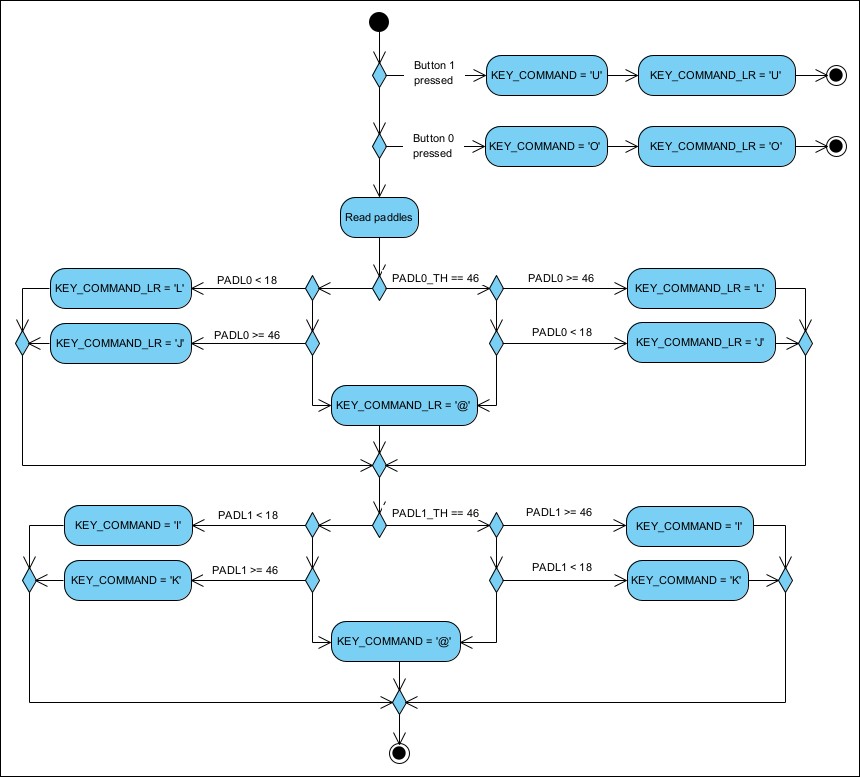
CHECK_FOR_MODE_1_INPUTThe READ_JOYSTICK_FOR_COMMAND routine reads the paddle buttons and joystick
state. If a paddle button is pressed, it translates to the dig left or dig right
keyboard command. Otherwise, the joystick state is read and compared to the
thresholds 0x12 and 0x2E, which can be reversed through the ctrl-X key,
and translated to left, right, up, or down keyboard commands.
    ORG     $6B81
PADDLE0_THRESH1:
    HEX     12
PADDLE0_THRESH2:
    HEX     2E
PADDLE1_THRESH1:
    HEX     12
PADDLE1_THRESH2:
    HEX     2E
    ORG     $6AD0
READ_JOYSTICK_FOR_COMMAND:
    SUBROUTINE

    LDA     BUTN1
    BPL     .check_butn0
    LDA     #$D5                  ; 'U' (dig)
    BNE     .store_key_command    ; unconditional

.check_butn0:
    LDA     BUTN0
    BPL     .read_paddles
    LDA     #$CF                  ; 'O' (dig)

.store_key_command
    STA     KEY_COMMAND
    STA     KEY_COMMAND_LR
    RTS

.read_paddles:
    JSR     READ_PADDLES
    LDY     PADDLE0_VALUE

    LDA     PADDLE0_THRESH2
    CMP     #$2E
    BEQ     .6afa
    ; PADDLE0_THRESH2 != 46

    CPY     PADDLE0_THRESH2
    BCS     .6b03
    ; PADDLE0_VALUE < PADDLE0_THRESH2

    LDA     #$CC                  ; 'L' (right)
    BNE     .check_paddle_1       ; unconditional

.6afa:
    CPY     PADDLE0_THRESH2
    BCC     .6b03
    ; PADDLE0_VALUE >= PADDLE0_THRESH2

    LDA     #$CC                  ; 'L' (right)
    BNE     .check_paddle_1       ; unconditional

.6b03:
    LDA     PADDLE0_THRESH1
    CMP     #$2E
    BEQ     .6b13
    ; PADDLE0_THRESH1 != 46

    CPY     PADDLE0_THRESH1
    BCS     .6b1c
    ; PADDLE0_VALUE < PADDLE0_THRESH1
    LDA     #$CA                  ; 'J' (left)
    BNE     .check_paddle_1       ; unconditional

.6b13:
    CPY     PADDLE0_THRESH1
    BCC     .6b1c
    ; PADDLE0_VALUE >= PADDLE0_THRESH1
    LDA     #$CA                  ; 'J' (left)
    BNE     .check_paddle_1       ; unconditional

.6b1c:
    LDA     #$C0                   ; '@'

.check_paddle_1:
    STA     KEY_COMMAND_LR

    LDY     PADDLE1_VALUE

    LDA     PADDLE1_THRESH1
    CMP     #$2E
    BEQ     .6b32
    ; PADDLE1_THRESH1 != 46

    CPY     PADDLE1_THRESH1
    BCS     .6b3b
    ; PADDLE1_VALUE >= PADDLE1_THRESH1

    LDA     #$C9                         ; 'I' (up)
    BNE     .store_key_command_end       ; unconditional

.6b32:
    CPY     PADDLE1_THRESH1
    BCC     .6b3b
    ; PADDLE1_VALUE < PADDLE1_THRESH1

    LDA     #$C9                         ; 'I' (up)
    BNE     .store_key_command_end       ; unconditional

.6b3b:
    LDA     PADDLE1_THRESH2
    CMP     #$2E
    BEQ     .6b4b
    ; PADDLE1_THRESH2 != 46

    CPY     PADDLE1_THRESH2
    BCS     .6b54
    ; PADDLE1_VALUE >= PADDLE1_THRESH2

    LDA     #$CB                         ; 'K' (down)
    BNE     .store_key_command_end       ; unconditional

.6b4b:
    CPY     PADDLE1_THRESH2
    BCC     .6b54
    ; PADDLE1_VALUE < PADDLE1_THRESH2

    LDA     #$CB                         ; 'K' (down)
    BNE     .store_key_command_end       ; unconditional

.6b54:
    LDA     #$C0                         ; '@'

.store_key_command_end:
    STA     KEY_COMMAND
    RTS
READ_JOYSTICK_FOR_COMMAND8.4 Player movement#
Player movement is generally handled by functions which check whether the player can move in a given direction, and then either fail with carry set, or succeed, and the player is moved, with carry cleared.
Recall that the player is at
the gross sprite location given by PLAYER_COL and PLAYER_ROW, but with a plus-or-minus
adjustment given by a horizontal adjustment PLAYER_X_ADJ and a vertical adjustment PLAYER_Y_ADJ.
We will refer to the player as
"exactly on" the sprite if the adjustment in the direction we're interested in is zero.
Again, recall that the adjustment values are offset by 2, so an adjustment of zero is a value
of 2, and the adjustment ranges from -2 to +2.
We can refer to the player as slightly above, below, left of, or right of, an exact sprite coordinate if the adjustment is not zero.
There are two routines which nudge the player towards an exact sprite row or column. Generally this is done when the player does something that has to take place on an exact row or column, such as climbing a ladder or traversing a rope, and serves to make the transition to an aligned row or column more smooth. Each time the player is nudged, we also check if the player landed on gold.
    ORG     $6C13
NUDGE_PLAYER_TOWARDS_EXACT_COLUMN:
    SUBROUTINE

    LDA     PLAYER_X_ADJ
    CMP     #$02
    BCC     .player_slightly_left
    BEQ     .end

.player_slightly_right:
    DEC     PLAYER_X_ADJ        ; Nudge player left
    JMP     CHECK_FOR_GOLD_PICKED_UP_BY_PLAYER

.player_slightly_left:
    INC     PLAYER_X_ADJ        ; Nudge player right
    JMP     CHECK_FOR_GOLD_PICKED_UP_BY_PLAYER

.end:
    RTS

    ORG     $6C26
NUDGE_PLAYER_TOWARDS_EXACT_ROW:
    SUBROUTINE

    LDA     PLAYER_Y_ADJ
    CMP     #$02
    BCC     .player_slightly_above
    BEQ     .end

.player_slightly_below:
    DEC     PLAYER_Y_ADJ        ; Nudge player up
    JMP     CHECK_FOR_GOLD_PICKED_UP_BY_PLAYER

.player_slightly_above:
    INC     PLAYER_Y_ADJ        ; Nudge player down
    JMP     CHECK_FOR_GOLD_PICKED_UP_BY_PLAYER

.end:
    RTS
NUDGE_PLAYER_TOWARDS_EXACT_COLUMN, NUDGE_PLAYER_TOWARDS_EXACT_ROWNow the logic for attempting to move up is:
- If the player location contains a ladder:
- If the player is slightly below the sprite, then move the player up.
- Otherwise, if the player is on row zero, the player cannot move up.
- Otherwise, if the sprite on the row above is brick, stone, or trap, the player cannot move up.
- Otherwise, the player can move up.
- Otherwise:
- If the player is not slightly below the sprite, the player cannot move up.
- Otherwise, if the sprite on the row below is not a ladder, the player cannot move up.
- Otherwise, the player can move up.
The steps involved in actually moving the player up are:
- Erase the player sprite.
- Reduce any horizontal adjustment, checking for gold pickup if not already exactly on a sprite column.
- Adjust the player vertically upwards by decrementing
PLAYER_Y_ADJ. - If the adjustment didn't roll over, check for gold pickup, then update the player animation for climbing, and draw the player.
- Otherwise:
- Copy the background sprite at the player's sprite location to the active page, unless that sprite is a brick, in which case place an empty on the active page.
- Decrement
PLAYER_ROW. - Put the player sprite on the active page at the new location.
- Set the player's vertical adjustment to
+2. - Update the player animation for climbing, and draw the player.
    ORG     $66BD
TRY_MOVING_UP:
    SUBROUTINE

    ⟨get background sprite at player location⟩
    CMP     #SPRITE_LADDER
    BEQ     .ladder_here

    LDY     PLAYER_Y_ADJ
    CPY     #$03
    BCC     .cannot_move       ; if PLAYER_Y_ADJ <= 2

    ; and if there's no ladder below, you can't move up.
    ⟨get background sprite at player location on next row⟩
    CMP     #SPRITE_LADDER
    BEQ     .move_player_up

.cannot_move:
    SEC
    RTS

.ladder_here:
    LDY     PLAYER_Y_ADJ
    CPY     #$03
    BCS     .move_player_up             ; if PLAYER_Y_ADJ > 2

    ; If you're at the top, you can't move up even if there's a ladder.
    LDY     PLAYER_ROW
    BEQ     .cannot_move       ; if PLAYER_ROW == 0, set carry and return

    ; You can't move up if there's a brick, stone, or trap above.
    LDA     CURR_LEVEL_ROW_SPRITES_PTR_OFFSETS-1,Y
    STA     PTR1
    LDA     CURR_LEVEL_ROW_SPRITES_PTR_PAGES-1,Y
    STA     PTR1+1
    LDY     PLAYER_COL
    LDA     (PTR1),Y                    ; Get the sprite on the row above.

    CMP     #SPRITE_BRICK
    BEQ     .cannot_move
    CMP     #SPRITE_STONE
    BEQ     .cannot_move
    CMP     #SPRITE_TRAP
    BEQ     .cannot_move       ; If brick, stone, or trap, set carry and return

.move_player_up:
    JSR     GET_SPRITE_AND_SCREEN_COORD_AT_PLAYER
    JSR     ERASE_SPRITE_AT_PIXEL_COORDS
    LDY     PLAYER_ROW
    <<set active and background row pointers [[PTR1]] and [[PTR2]] for [[Y]]>>
    JSR     NUDGE_PLAYER_TOWARDS_EXACT_COLUMN
    DEC     PLAYER_Y_ADJ                ; Move player up
    BPL     TRY_MOVING_UP_check_for_gold

    ; PLAYER_Y_ADJ rolled over.

    ; Restore the sprite at the player's former location:
    ; If background page at player location is brick, put an empty at the
    ; (previous) player location on active page, otherwise copy the background
    ; sprite to the active page.
    LDY     PLAYER_COL
    LDA     (PTR2),Y
    CMP     #SPRITE_BRICK
    BNE     .set_on_real_page
    LDA     #SPRITE_EMPTY
.set_on_real_page:
    STA     (PTR1),Y

    DEC     PLAYER_ROW                  ; Move player up
    LDY     PLAYER_ROW
    <<set active row pointer [[PTR1]] for [[Y]]>>
    LDY     PLAYER_COL
    LDA     #SPRITE_PLAYER
    STA     (PTR1),Y            ; Write player sprite to active page.
    LDA     #$04
    STA     PLAYER_Y_ADJ        ; Set adjustment to +2
    BNE     TRY_MOVING_UP_inc_anim_state     ; unconditional

TRY_MOVING_UP_check_for_gold:
    JSR     CHECK_FOR_GOLD_PICKED_UP_BY_PLAYER

TRY_MOVING_UP_inc_anim_state:
    LDA     #$10
    LDX     #$11
    JSR     INC_ANIM_STATE      ; player climbing on ladder
    JSR     DRAW_PLAYER
    CLC
    RTS
TRY_MOVING_UPFor attempting to move down, the logic is:
- If the player is slightly above the sprite, then move the player down.
- Otherwise, if the player is on row 15 or more, the player cannot move down.
- Otherwise, if the row below is stone or brick, the player cannot move down.
- Otherwise, the player can move down.
The steps involved in actually moving the player down are:
- Erase the player sprite.
- Reduce any horizontal adjustment, checking for gold pickup if not already exactly on a sprite column.
- Adjust the player vertically downwards by incrementing
PLAYER_Y_ADJ. - If the adjustment didn't roll over, check for gold pickup, then update the player animation for climbing, and draw the player.
- Otherwise:
- Copy the background sprite at the player's sprite location to the active page, unless that sprite is a brick, in which case place an empty on the active page.
- Increment
PLAYER_ROW. - Put the player sprite on the active page at the new location.
- Set the player's vertical adjustment to
-2. - Update the player animation for climbing, and draw the player.
    ORG     $6766
TRY_MOVING_DOWN:
    SUBROUTINE

    LDY     PLAYER_Y_ADJ
    CPY     #$02
    BCC     .move_player_down   ; player slightly above, so can move down.

    LDY     PLAYER_ROW
    CPY     #MAX_GAME_ROW
    BCS     .cannot_move        ; player on row >= 15, so cannot move.

    <<set active row pointer [[PTR1]] for [[Y+1]]>>
    LDY     PLAYER_COL
    LDA     (PTR1),Y
    CMP     #SPRITE_STONE
    BEQ     .cannot_move
    CMP     #SPRITE_BRICK
    BNE     .move_player_down   ; Row below is stone or brick, so cannot move.

.cannot_move:
    SEC
    RTS

.move_player_down:
    JSR     GET_SPRITE_AND_SCREEN_COORD_AT_PLAYER
    JSR     ERASE_SPRITE_AT_PIXEL_COORDS
    LDY     PLAYER_ROW
    <<set active and background row pointers [[PTR1]] and [[PTR2]] for [[Y]]>>
    JSR     NUDGE_PLAYER_TOWARDS_EXACT_COLUMN
    INC     PLAYER_Y_ADJ                ; Move player down
    LDA     PLAYER_Y_ADJ
    CMP     #$05
    BCC     .check_for_gold_

    ; adjustment overflow
    LDY     PLAYER_COL
    LDA     (PTR2),Y
    CMP     #SPRITE_BRICK
    BNE     .set_on_real_page
    LDA     #SPRITE_EMPTY
.set_on_real_page:
    STA     (PTR1),Y

    INC     PLAYER_ROW
    LDY     PLAYER_ROW
    <<set active row pointer [[PTR1]] for [[Y]]>>
    LDY     PLAYER_COL
    LDA     #SPRITE_PLAYER
    STA     (PTR1),Y            ; Write player sprite to active page.
    LDA     #SPRITE_EMPTY
    STA     PLAYER_Y_ADJ        ; Set adjustment to -2
    JMP     TRY_MOVING_UP_inc_anim_state

.check_for_gold_:
    JMP     TRY_MOVING_UP_check_for_gold
TRY_MOVING_DOWNFor attempting to move left, the logic is:
- If the player is slightly right of the sprite, then move the player left.
- Otherwise, if the player is on column 0, the player cannot move left.
- Otherwise, if the column to the left is stone, brick, or trap, the player cannot move left.
- Otherwise, the player can move left.
The steps involved in actually moving the player left are:
- Erase the player sprite.
- Set the
PLAYER_FACING_DIRECTIONto left (0xFF). - Reduce any vertical adjustment, checking for gold pickup if not already exactly on a sprite column.
- Adjust the player horizontally to the left by decrementing
PLAYER_X_ADJ. - If the adjustment didn't roll over, check for gold pickup, then update the player animation for moving left, and draw the player.
- Otherwise:
- Copy the background sprite at the player's sprite location to the active page, unless that sprite is a brick, in which case place an empty on the active page.
- Decrement
PLAYER_COL. - Put the player sprite on the active page at the new location.
- Set the player's horizontal adjustment to
+2. - Update the player animation for moving left, and draw the player.
The animation is either monkey-traversing if the player moves onto a rope, or running otherwise.
    ORG     $65D3
TRY_MOVING_LEFT:
    SUBROUTINE

    LDY     PLAYER_ROW
    <<set active and background row pointers [[PTR1]] and [[PTR2]] for [[Y]]>>
    LDX     PLAYER_X_ADJ
    CPX     #$03
    BCS     .move_player_left       ; player slightly right, so can move left.

    LDY     PLAYER_COL
    BEQ     .cannot_move            ; col == 0, so cannot move.

    DEY
    LDA     (PTR1),Y
    CMP     #SPRITE_STONE
    BEQ     .cannot_move
    CMP     #SPRITE_BRICK
    BEQ     .cannot_move
    CMP     #SPRITE_TRAP
    BNE     .move_player_left       ; brick, stone, or trap to left, so cannot move.

.cannot_move:
    RTS

.move_player_left:
    JSR     GET_SPRITE_AND_SCREEN_COORD_AT_PLAYER
    JSR     ERASE_SPRITE_AT_PIXEL_COORDS
    LDA     #$FF
    STA     PLAYER_FACING_DIRECTION             ; face left
    JSR     NUDGE_PLAYER_TOWARDS_EXACT_ROW
    DEC     PLAYER_X_ADJ
    BPL     .check_for_gold

    ; adjustment overflow
    LDY     PLAYER_COL
    LDA     (PTR2),Y
    CMP     #SPRITE_BRICK
    BNE     .set_on_level
    LDA     #SPRITE_EMPTY
.set_on_level:
    STA     (PTR1),Y

    DEC     PLAYER_COL
    DEY
    LDA     #SPRITE_PLAYER
    STA     (PTR1),Y            ; Write player sprite to active page.
    LDA     #$04
    STA     PLAYER_X_ADJ        ; Set adjustment to +2
    BNE     .inc_anim_state     ; Unconditional

.check_for_gold:
    JSR     CHECK_FOR_GOLD_PICKED_UP_BY_PLAYER

.inc_anim_state:
    LDY     PLAYER_COL
    LDA     (PTR2),Y
    CMP     #SPRITE_ROPE
    BEQ     .anim_state_monkeying

    LDA     #$00
    LDX     #$02
    BNE     .done               ; Unconditional

.anim_state_monkeying:
    LDA     #$03
    LDX     #$05

.done:
    JSR     INC_ANIM_STATE
    JMP     DRAW_PLAYER
TRY_MOVING_LEFTMoving right has the same logic as moving left, except in the other direction.
    ORG     $6645
TRY_MOVING_RIGHT:
    SUBROUTINE

    LDY     PLAYER_ROW
    <<set active and background row pointers [[PTR1]] and [[PTR2]] for [[Y]]>>
    LDX     PLAYER_X_ADJ
    CPX     #$02
    BCC     .move_player_right      ; player slightly left, so can move right.

    LDY     PLAYER_COL
    CPY     #MAX_GAME_COL
    BEQ     .cannot_move            ; col == 27, so cannot move.

    INY
    LDA     (PTR1),Y
    CMP     #SPRITE_STONE
    BEQ     .cannot_move
    CMP     #SPRITE_BRICK
    BEQ     .cannot_move
    CMP     #SPRITE_TRAP
    BNE     .move_player_right      ; brick, stone, or trap to right, so cannot move.

.cannot_move:
    RTS

.move_player_right:
    JSR     GET_SPRITE_AND_SCREEN_COORD_AT_PLAYER
    JSR     ERASE_SPRITE_AT_PIXEL_COORDS
    LDA     #$01
    STA     PLAYER_FACING_DIRECTION             ; face right
    JSR     NUDGE_PLAYER_TOWARDS_EXACT_ROW
    INC     PLAYER_X_ADJ
    LDA     PLAYER_X_ADJ
    CMP     #$05
    BCC     .check_for_gold

    ; adjustment overflow
    LDY     PLAYER_COL
    LDA     (PTR2),Y
    CMP     #SPRITE_BRICK
    BNE     .set_on_level
    LDA     #SPRITE_EMPTY
.set_on_level:
    STA     (PTR1),Y

    INC     PLAYER_COL
    INY
    LDA     #SPRITE_PLAYER
    STA     (PTR1),Y            ; Write player sprite to active page.
    LDA     #$00
    STA     PLAYER_X_ADJ        ; Set adjustment to -2
    BEQ     .inc_anim_state     ; Unconditional

.check_for_gold:
    JSR     CHECK_FOR_GOLD_PICKED_UP_BY_PLAYER

.inc_anim_state:
    LDY     PLAYER_COL
    LDA     (PTR2),Y
    CMP     #SPRITE_ROPE
    BEQ     .anim_state_monkeying

    LDA     #$08
    LDX     #$0A
    BNE     .done               ; Unconditional

.anim_state_monkeying:
    LDA     #$0B
    LDX     #$0D

.done:
    JSR     INC_ANIM_STATE
    JMP     DRAW_PLAYER
TRY_MOVING_RIGHT8.5 Digging#
Provided there's nothing preventing the player from digging, digging involves a brick animation below and next to the player, and a "debris" animation above the dig site.
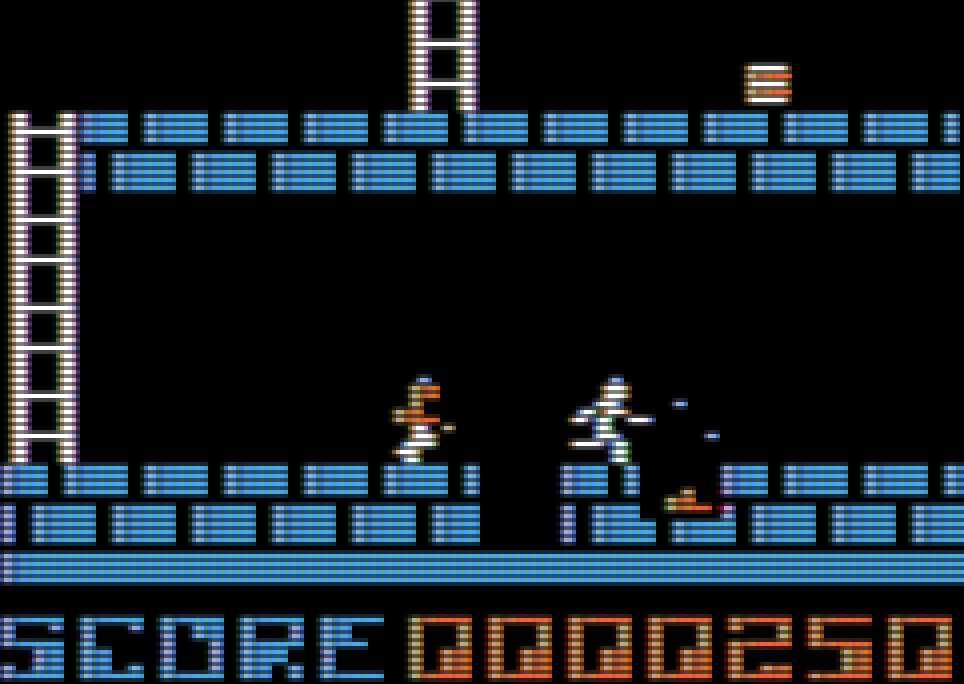
The DIG_DIRECTION location stores which direction we're digging in, and the DIG_ANIM_STATE
location stores how far along in the 13-step animation cycle we are.
DIG_DIRECTION       EQU     $9C     ; 0xFF = left, 0x00 = not digging, 0x01 = right
DIG_ANIM_STATE      EQU     $A0     ; 00-0C
The DIG_DEBRIS_LEFT_SPRITES, DIG_DEBRIS_RIGHT_SPRITES and DIG_BRICK_SPRITES tables
contain the sprites used during
the animation. There's also a little sequence of notes that plays while digging, given by
DIG_NOTE_PITCHES and DIG_NOTE_DURATIONS.
    ORG     $697A
DIG_DEBRIS_LEFT_SPRITES:
    HEX     1B 1B 1C 1C 1D 1D 1E 1E 00 00 00 00
DIG_DEBRIS_RIGHT_SPRITES:
    HEX     26 26 27 27 1D 1D 1E 1E 00 00 00 00
DIG_BRICK_SPRITES:
    HEX     1F 1F 20 20 21 21 22 22 23 23 24 24
DIG_NOTE_PITCHES:
    HEX     20 20 20 20 20 20 20 20 24 24 24 24 24
DIG_NOTE_DURATIONS:
    HEX     04 04 04 04 04 04 04 04 03 03 02 02 01
The player cannot dig to the left if they're on the bottom-most row or the leftmost column, or if there's no brick below and to the left. Also, there has to be nothing to the left of the player.
    ORG     $67D8
    SUBROUTINE

.cannot_dig_:
    JMP     .stop_digging

TRY_DIGGING_LEFT:
    LDA     #$FF
    STA     DIG_DIRECTION
    STA     KEY_COMMAND
    STA     KEY_COMMAND_LR      ; DIG_DIRECTION = KEY_COMMANDs = 0xFF
    LDA     #$00
    STA     DIG_ANIM_STATE      ; DIG_ANIM_STATE = 0

TRY_DIGGING_LEFT_check_can_dig_left:
    LDY     PLAYER_ROW
    CPY     #MAX_GAME_ROW
    BCS     .cannot_dig_        ; row >= 15, so cannot dig.

    INY
    JSR     GET_PTRS_TO_CURR_LEVEL_SPRITE_DATA
    LDY     PLAYER_COL
    BEQ     .cannot_dig_        ; col == 0, so cannot dig left.

    DEY
    LDA     (PTR1),Y
    CMP     #SPRITE_BRICK
    BNE     .cannot_dig_        ; no brick below and to the left, so cannot dig left.

    LDY     PLAYER_ROW
    JSR     GET_PTRS_TO_CURR_LEVEL_SPRITE_DATA
    LDY     PLAYER_COL
    DEY
    LDA     (PTR1),Y
    CMP     #SPRITE_EMPTY
    BNE     .not_empty_to_left  ; not empty to the left, so maybe cannot dig left.

    ; Can dig!
    JSR     GET_SPRITE_AND_SCREEN_COORD_AT_PLAYER
    JSR     ERASE_SPRITE_AT_PIXEL_COORDS
    JSR     NUDGE_PLAYER_TOWARDS_EXACT_COLUMN
    JSR     NUDGE_PLAYER_TOWARDS_EXACT_ROW
    LDY     DIG_ANIM_STATE
    LDA     DIG_NOTE_PITCHES,Y
    LDX     DIG_NOTE_DURATIONS,Y
    JSR     APPEND_NOTE

    LDX     DIG_ANIM_STATE
    LDA     #$00                ; running left
    CPX     #$06
    BCS     .note_0             ; DIG_ANIM_STATE >= 6
    LDA     #$06                ; digging left
.note_0:
    STA     PLAYER_ANIM_STATE
    JSR     DRAW_PLAYER

    LDX     DIG_ANIM_STATE
    CPX     #$0C
    BEQ     .move_player_left
    CPX     #$00
    BEQ     .draw_curr_dig              ; Don't have to erase previous dig debris sprite

    ; Erase the previous dig debris sprite
    LDA     DIG_DEBRIS_LEFT_SPRITES-1,X
    PHA
    LDX     PLAYER_COL
    DEX
    LDY     PLAYER_ROW
    JSR     GET_SCREEN_COORDS_FOR
    PLA
    JSR     ERASE_SPRITE_AT_PIXEL_COORDS

    LDX     DIG_ANIM_STATE
.draw_curr_dig:
    LDA     DIG_DEBRIS_LEFT_SPRITES,X
    PHA
    LDX     PLAYER_COL
    DEX
    STX     GAME_COLNUM
    LDY     PLAYER_ROW
    STY     GAME_ROWNUM
    JSR     GET_SCREEN_COORDS_FOR
    PLA
    JSR     DRAW_SPRITE_AT_PIXEL_COORDS     ; Draw current dig debris sprite above dig site

    LDX     DIG_ANIM_STATE
    LDA     DIG_BRICK_SPRITES,X
    INC     GAME_ROWNUM
    JSR     DRAW_SPRITE_PAGE1               ; Draw dig brick sprite at dig site

    INC     DIG_ANIM_STATE
    CLC
    RTS

.not_empty_to_left:
    LDY     PLAYER_ROW
    INY
    STY     GAME_ROWNUM
    LDY     PLAYER_COL
    DEY
    STY     GAME_COLNUM
    LDA     #SPRITE_BRICK
    JSR     DRAW_SPRITE_PAGE1           ; Draw brick below and to the left of player

    LDX     DIG_ANIM_STATE
    BEQ     .stop_digging

    ; Erase previous dig debris sprite
    DEX
    LDA     DIG_DEBRIS_LEFT_SPRITES,X
    PHA
    LDY     PLAYER_ROW
    LDX     PLAYER_COL
    DEX
    JSR     GET_SCREEN_COORDS_FOR
    PLA
    JSR     ERASE_SPRITE_AT_PIXEL_COORDS

.stop_digging:
    LDA     #$00
    STA     DIG_DIRECTION
    SEC
    RTS

.move_player_left:
    LDX     PLAYER_COL
    DEX
    JMP     DROP_PLAYER_IN_HOLE
TRY_DIGGING_LEFTAPPEND_NOTE, DIG_BRICK_SPRITES, DIG_DEBRIS_LEFT_SPRITES, DIG_DIRECTION, DIG_NOTE_DURATIONS, DIG_NOTE_PITCHES, DRAW_PLAYER, DRAW_SPRITE_AT_PIXEL_COORDS, DRAW_SPRITE_PAGE1, DROP_PLAYER_IN_HOLE, ERASE_SPRITE_AT_PIXEL_COORDS, GAME_COLNUM, GAME_ROWNUM, GET_PTRS_TO_CURR_LEVEL_SPRITE_DATA, GET_SCREEN_COORDS_FOR, GET_SPRITE_AND_SCREEN_COORD_AT_PLAYER, KEY_COMMAND, KEY_COMMAND_LR, NUDGE_PLAYER_TOWARDS_EXACT_COLUMN, NUDGE_PLAYER_TOWARDS_EXACT_ROW, PLAYER_ANIM_STATE, PLAYER_COL, PLAYER_ROW, PTR1ORG $689E SUBROUTINE .cannot_dig_: JMP .stop_digging TRY_DIGGING_RIGHT: LDA #$01 STA DIG_DIRECTION STA KEY_COMMAND STA KEY_COMMAND_LR ; DIG_DIRECTION = KEY_COMMANDs = 0x01 LDA #$0C STA DIG_ANIM_STATE ; DIG_ANIM_STATE = 0x0C TRY_DIGGING_RIGHT_check_can_dig_right: LDY PLAYER_ROW CPY #MAX_GAME_ROW BCS .cannot_dig_ ; row >= 15, so cannot dig. INY JSR GET_PTRS_TO_CURR_LEVEL_SPRITE_DATA LDY PLAYER_COL CPY #MAX_GAME_COL BCS .cannot_dig_ ; col >= 27, so cannot dig right. INY LDA (PTR1),Y CMP #SPRITE_BRICK BNE .cannot_dig_ ; no brick below and to the right, so cannot dig right. LDY PLAYER_ROW JSR GET_PTRS_TO_CURR_LEVEL_SPRITE_DATA LDY PLAYER_COL INY LDA (PTR1),Y CMP #SPRITE_EMPTY BNE .not_empty_to_right ; not empty to the right, so maybe cannot dig right. ; Can dig! JSR GET_SPRITE_AND_SCREEN_COORD_AT_PLAYER JSR ERASE_SPRITE_AT_PIXEL_COORDS JSR NUDGE_PLAYER_TOWARDS_EXACT_COLUMN JSR NUDGE_PLAYER_TOWARDS_EXACT_ROW LDY DIG_ANIM_STATE LDA DIG_NOTE_PITCHES-12,Y LDX DIG_NOTE_DURATIONS-12,Y JSR APPEND_NOTE LDX DIG_ANIM_STATE LDA #$08 ; running right CPX #$12 BCS .note_0 ; DIG_ANIM_STATE >= 0x12 LDA #$0E ; digging right .note_0: STA PLAYER_ANIM_STATE JSR DRAW_PLAYER LDX DIG_ANIM_STATE CPX #$18 BEQ .move_player_right CPX #$0C BEQ .draw_curr_dig ; Don't have to erase previous dig debris sprite ; Erase the previous dig debris sprite LDA DIG_DEBRIS_LEFT_SPRITES-1,X PHA LDX PLAYER_COL INX LDY PLAYER_ROW JSR GET_SCREEN_COORDS_FOR PLA JSR ERASE_SPRITE_AT_PIXEL_COORDS LDX DIG_ANIM_STATE .draw_curr_dig: LDA DIG_DEBRIS_LEFT_SPRITES,X PHA LDX PLAYER_COL INX STX GAME_COLNUM LDY PLAYER_ROW STY GAME_ROWNUM JSR GET_SCREEN_COORDS_FOR PLA JSR DRAW_SPRITE_AT_PIXEL_COORDS ; Draw current dig debris sprite above dig site INC GAME_ROWNUM LDX DIG_ANIM_STATE LDA DIG_BRICK_SPRITES-12,X JSR DRAW_SPRITE_PAGE1 ; Draw dig brick sprite at dig site INC DIG_ANIM_STATE CLC RTS .not_empty_to_right: LDY PLAYER_ROW INY STY GAME_ROWNUM LDY PLAYER_COL INY STY GAME_COLNUM LDA #SPRITE_BRICK JSR DRAW_SPRITE_PAGE1 ; Draw brick below and to the right of player LDX DIG_ANIM_STATE CPX #$0C BEQ .stop_digging ; Erase previous dig debris sprite DEX LDA DIG_DEBRIS_LEFT_SPRITES,X PHA LDX PLAYER_COL INX LDY PLAYER_ROW JSR GET_SCREEN_COORDS_FOR PLA JSR ERASE_SPRITE_AT_PIXEL_COORDS .stop_digging: LDA #$00 STA DIG_DIRECTION SEC RTS .move_player_right: LDX PLAYER_COL INX JMP DROP_PLAYER_IN_HOLE
TRY_DIGGING_RIGHTAPPEND_NOTE, DIG_BRICK_SPRITES, DIG_DEBRIS_LEFT_SPRITES, DIG_DIRECTION, DIG_NOTE_DURATIONS, DIG_NOTE_PITCHES, DRAW_PLAYER, DRAW_SPRITE_AT_PIXEL_COORDS, DRAW_SPRITE_PAGE1, DROP_PLAYER_IN_HOLE, ERASE_SPRITE_AT_PIXEL_COORDS, GAME_COLNUM, GAME_ROWNUM, GET_PTRS_TO_CURR_LEVEL_SPRITE_DATA, GET_SCREEN_COORDS_FOR, GET_SPRITE_AND_SCREEN_COORD_AT_PLAYER, KEY_COMMAND, KEY_COMMAND_LR, NUDGE_PLAYER_TOWARDS_EXACT_COLUMN, NUDGE_PLAYER_TOWARDS_EXACT_ROW, PLAYER_ANIM_STATE, PLAYER_COL, PLAYER_ROW, PTR1ORG $6C39 DROP_PLAYER_IN_HOLE: SUBROUTINE LDA #$00 STA DIG_DIRECTION ; Stop digging LDY PLAYER_ROW INY ; Move player down STX GAME_COLNUM STY GAME_ROWNUM <<set active row pointer [[PTR1]] for [[Y]]>> LDA #SPRITE_EMPTY LDY GAME_COLNUM STA (PTR1),Y ; Set blank sprite at player location in active page JSR DRAW_SPRITE_PAGE1 LDA #SPRITE_EMPTY JSR DRAW_SPRITE_PAGE2 ; Draw blank at player location on both graphics pages DEC GAME_ROWNUM LDA #SPRITE_EMPTY JSR DRAW_SPRITE_PAGE1 ; Draw blank at location above player INC GAME_ROWNUM LDX #$FF .loop: INX CPX #$1E BEQ .end LDA BRICK_FILL_TIMERS,X BNE .loop LDA GAME_ROWNUM STA BRICK_DIG_ROWS,X LDA GAME_COLNUM STA BRICK_DIG_COLS,X LDA #$B4 STA BRICK_FILL_TIMERS,X SEC .end: RTS
DROP_PLAYER_IN_HOLEThe MOVE_PLAYER routine handle continuation of digging, player falling, and player keyboard input.
    ORG     $64BD
MOVE_PLAYER:
    SUBROUTINE

    LDA     #$01
    STA     DIDNT_PICK_UP_GOLD   ; Reset DIDNT_PICK_UP_GOLD

    ; If we're digging, see if we can keep digging.
    LDA     DIG_DIRECTION
    BEQ     .not_digging
    BPL     .digging_right
    JMP     TRY_DIGGING_LEFT_check_can_dig_left

.digging_right:
    JMP     TRY_DIGGING_RIGHT_check_can_dig_right

.not_digging:
    LDY     PLAYER_ROW
    <<set background row pointer [[PTR2]] for [[Y]]>>
    LDY     PLAYER_COL
    LDA     (PTR2),Y
    CMP     #SPRITE_LADDER
    BEQ     .check_for_keyboard_input_      ; ladder at background location?
    CMP     #SPRITE_ROPE
    BNE     .check_if_player_should_fall    ; rope at background location?
    LDA     PLAYER_Y_ADJ
    CMP     #$02
    BEQ     .check_for_keyboard_input_      ; player at exact sprite row?

    ; player is not on exact sprite row, fallthrough.

.check_if_player_should_fall:
    LDA     PLAYER_Y_ADJ
    CMP     #$02
    BCC     .make_player_fall               ; player slightly above sprite row?

    LDY     PLAYER_ROW
    CPY     #MAX_GAME_ROW
    BEQ     .check_for_keyboard_input_      ; player exactly sprite row 15?

    ; Check the sprite at the player location
    <<set active and background row pointers [[PTR1]] and [[PTR2]] for [[Y+1]]>>

    LDY     PLAYER_COL
    LDA     (PTR1),Y
    CMP     #SPRITE_EMPTY
    BEQ     .make_player_fall
    CMP     #SPRITE_GUARD
    BEQ     .check_for_keyboard_input_
    LDA     (PTR2),Y
    CMP     #SPRITE_BRICK
    BEQ     .check_for_keyboard_input_
    CMP     #SPRITE_STONE
    BEQ     .check_for_keyboard_input_
    CMP     #SPRITE_LADDER
    BNE     .make_player_fall

.check_for_keyboard_input_:
    JMP     .check_for_keyboard_input

.make_player_fall:
    LDA     #$00
    STA     $9B                     ; $9B = 0
    JSR     GET_SPRITE_AND_SCREEN_COORD_AT_PLAYER
    JSR     ERASE_SPRITE_AT_PIXEL_COORDS

    LDA     #$07                    ; Next anim state: player falling, facing left
    LDX     PLAYER_FACING_DIRECTION
    BMI     .player_facing_left
    LDA     #$0F                    ; Next anim state: player falling, facing right
.player_facing_left:
    STA     PLAYER_ANIM_STATE

    JSR     NUDGE_PLAYER_TOWARDS_EXACT_COLUMN

    INC     PLAYER_Y_ADJ            ; Move down one
    LDA     PLAYER_Y_ADJ
    CMP     #$05
    BCS     .adjustment_overflow

    JSR     CHECK_FOR_GOLD_PICKED_UP_BY_PLAYER
    JMP     DRAW_PLAYER            ; tailcall

.adjustment_overflow:
    LDA     #$00
    STA     PLAYER_Y_ADJ            ; Set vertical adjust to -2

    LDY     PLAYER_ROW
    <<set active and background row pointers [[PTR1]] and [[PTR2]] for [[Y]]>>
    LDY     PLAYER_COL
    LDA     (PTR2),Y
    CMP     #SPRITE_BRICK
    BNE     .set_on_level
    LDA     #SPRITE_EMPTY
.set_on_level:
    STA     (PTR1),Y
    INC     PLAYER_ROW          ; Move down
    LDY     PLAYER_ROW
    <<set active row pointer [[PTR1]] for [[Y]]>>

    LDY     PLAYER_COL
    LDA     #SPRITE_PLAYER
    STA     (PTR1),Y
    JMP     DRAW_PLAYER     ; tailcall

.check_for_keyboard_input:
    LDA     $9B
    BNE     .check_for_key  ; $9B doesn't play note
    LDA     #$64
    LDX     #$08
    JSR     PLAY_NOTE       ; play note, pitch 0x64, duration 8.

.check_for_key:
    LDA     #$20
    STA     $A4
    STA     $9B
    JSR     CHECK_FOR_INPUT
    LDA     KEY_COMMAND
    CMP     #$C9            ; 'I'
    BNE     .check_for_K
    JSR     TRY_MOVING_UP
    BCS     .check_for_J    ; couldn't move up
    RTS

.check_for_K:
    CMP     #$CB            ; 'K'
    BNE     .check_for_U
    JSR     TRY_MOVING_DOWN
    BCS     .check_for_J
    RTS

.check_for_U:
    CMP     #$D5            ; 'U'
    BNE     .check_for_O
    JSR     TRY_DIGGING_LEFT
    BCS     .check_for_J
    RTS

.check_for_O:
    CMP     #$CF            ; 'O'
    BNE     .check_for_J
    JSR     TRY_DIGGING_RIGHT
    BCS     .check_for_J
    RTS

.check_for_J:
    LDA     KEY_COMMAND_LR
    CMP     #$CA            ; 'J'
    BNE     .check_for_L
    JMP     TRY_MOVING_LEFT

.check_for_L:
    CMP     #$CC            ; 'L'
    BNE     .end
    JMP     TRY_MOVING_RIGHT

.end:
    RTS
MOVE_PLAYERCHECK_FOR_GOLD_PICKED_UP_BY_PLAYER, CHECK_FOR_INPUT, DIDNT_PICK_UP_GOLD, DIG_DIRECTION, DRAW_PLAYER, ERASE_SPRITE_AT_PIXEL_COORDS, GET_SPRITE_AND_SCREEN_COORD_AT_PLAYER, KEY_COMMAND, KEY_COMMAND_LR, NUDGE_PLAYER_TOWARDS_EXACT_COLUMN, PLAYER_ANIM_STATE, PLAYER_COL, PLAYER_ROW, PLAYER_Y_ADJ, PLAY_NOTE, PTR1, PTR2, TRY_DIGGING_LEFT, TRY_DIGGING_RIGHT, TRY_MOVING_DOWN, TRY_MOVING_LEFT, TRY_MOVING_RIGHT, TRY_MOVING_UPENABLE_NEXT_LEVEL_LADDERS goes through the registered ladder locations from last to first. Recall that
the ladder indices are 1-based, so that LADDER_LOCS_[0] does not contain ladder data. Instead,
that location is used as scratch space by this routine.
Recall also that LADDER_LOCS_[X] is negative if there is no ladder corresponding to entry X.
For each ladder, if there's a non-blank sprite on the background sprite page for it, we set
LADDER_LOCS_COL to 1.
However, if there is a blank sprite on the background sprite page for it, then set it to the ladder sprite, and if it's also blank on the active sprite page, set that to the ladder sprite, too. Then draw the ladder on the background and active graphics pages, remove the ladder from the registered locations, and keep going.
Once all ladder locations have been gone through, if LADDER_LOCS_COL is 1—that is,
if there was a non-blank sprite on the background sprite page for any ladder location—then
decrement the gold count. Since this routine is only called when GOLD_COUNT is zero,
this sets GOLD_COUNT to -1.
    ORG     $8631
ENABLE_NEXT_LEVEL_LADDERS:
    SUBROUTINE

    LDA     #$00
    STA     LADDER_LOCS_COL     ; LADDER_LOCS_COL = 0

    LDX     LADDER_COUNT
    STX     .count              ; .count backwards from LADDER_COUNT to 0
.loop:
    LDX     .count
    BEQ     .dec_gold_count_if_no_ladder

    LDA     LADDER_LOCS_COL,X   ; A = LADDER_LOCS_COL[X]
    BMI     .next               ; If not present, next.

    STA     GAME_COLNUM         ; GAME_COLNUM = LADDER_LOCS_COL[X]
    LDA     LADDER_LOCS_ROW,X
    STA     GAME_ROWNUM         ; GAME_ROWNUM = LADDER_LOCS_ROW[X]
    TAY
    <<set active and background row pointers [[PTR1]] and [[PTR2]] for [[Y]]>>
    LDY     GAME_COLNUM
    LDA     (PTR2),Y            ; A = sprite at ladder loc
    BNE     .set_col_to_1

    LDA     #SPRITE_LADDER
    STA     (PTR2),Y            ; Set background sprite to ladder
    LDA     (PTR1),Y
    BNE     .draw_ladder        ; .draw_ladder if active sprite not blank

    LDA     #SPRITE_LADDER
    STA     (PTR1),Y            ; Set active sprite to ladder

.draw_ladder:
    LDA     #SPRITE_LADDER
    JSR     DRAW_SPRITE_PAGE2   ; Draw ladder on background page

    LDX     GAME_COLNUM
    LDY     GAME_ROWNUM
    JSR     GET_SCREEN_COORDS_FOR
    LDA     #SPRITE_LADDER
    JSR     DRAW_SPRITE_AT_PIXEL_COORDS ; Draw ladder on active page

    LDX     .count
    LDA     #$FF
    STA     LADDER_LOCS_COL,X       ; Remove ladder loc
    BMI     .next                   ; Unconditional

.set_col_to_1:
    LDA     #$01
    STA     LADDER_LOCS_COL         ; LADDER_LOCS_COL = 1

.next:
    DEC     .count
    JMP     .loop

.dec_gold_count_if_no_ladder:
    LDA     LADDER_LOCS_COL
    BNE     .end
    DEC     GOLD_COUNT

.end:
    RTS

.count:
    BYTE    0
ENABLE_NEXT_LEVEL_LADDERS